Arena Manual
Learn the arena. Build the file. Win the courtroom.
A practical guide to generating fresh disputes, building stronger fact sheets, negotiating when the deal is right, and turning better intake work into better courtroom outcomes.
01
Getting Started
Legal Arena is built around a repeatable loop: choose a country, practice area, and pressure level; generate a fresh dispute; interview your side; build a usable fact sheet; then settle or argue the matter in court.
If you are opening the app for the first time, this section will help you understand what each stage is for and how to get into a case quickly without wasting early turns.
- Sign in and open the dashboard: After access is granted, head to the dashboard. This is your case hub, leaderboard view, and progression screen.
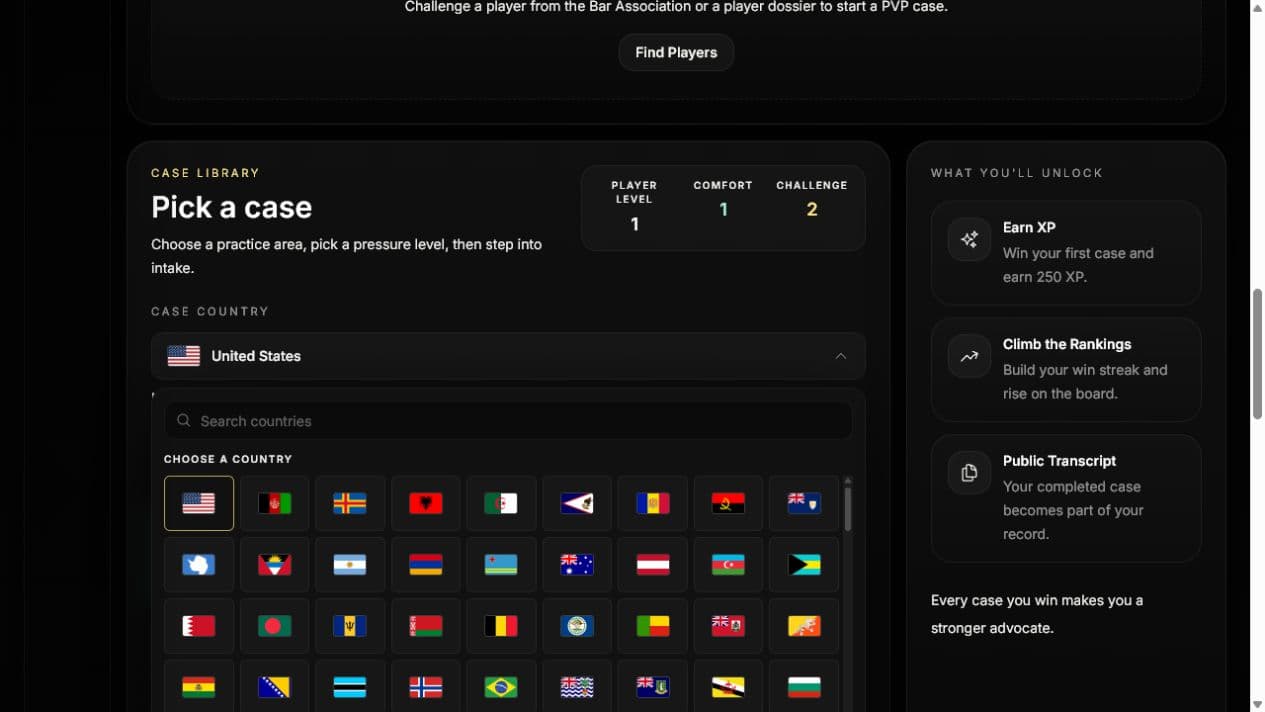
- Choose the case country: The selected country shapes the names, setting, institutions, currency, dispute details, and portraits used in newly generated matters. Search the flag grid or select a flag directly. Your choice is saved to your player profile.
- Choose a practice area and pressure level: Pick the kind of dispute you want, then choose the available complexity. Country changes the cultural setting; pressure level controls how many issues, contradictions, proof gaps, and tactical decisions the matter contains.
- Use Ready, Stretch, and Locked as your guide: Your overall player level and experience in the selected practice area determine the pressure levels available to you. Ready levels sit within your current range, Stretch is one level above it, and higher levels remain locked until your record develops.
- Know that side assignment matters: A session can place you on either side of the dispute. Once the case opens, Legal Arena clearly tells you which party you represent so you can question your client and frame your theory from the correct angle.
Case selection panel
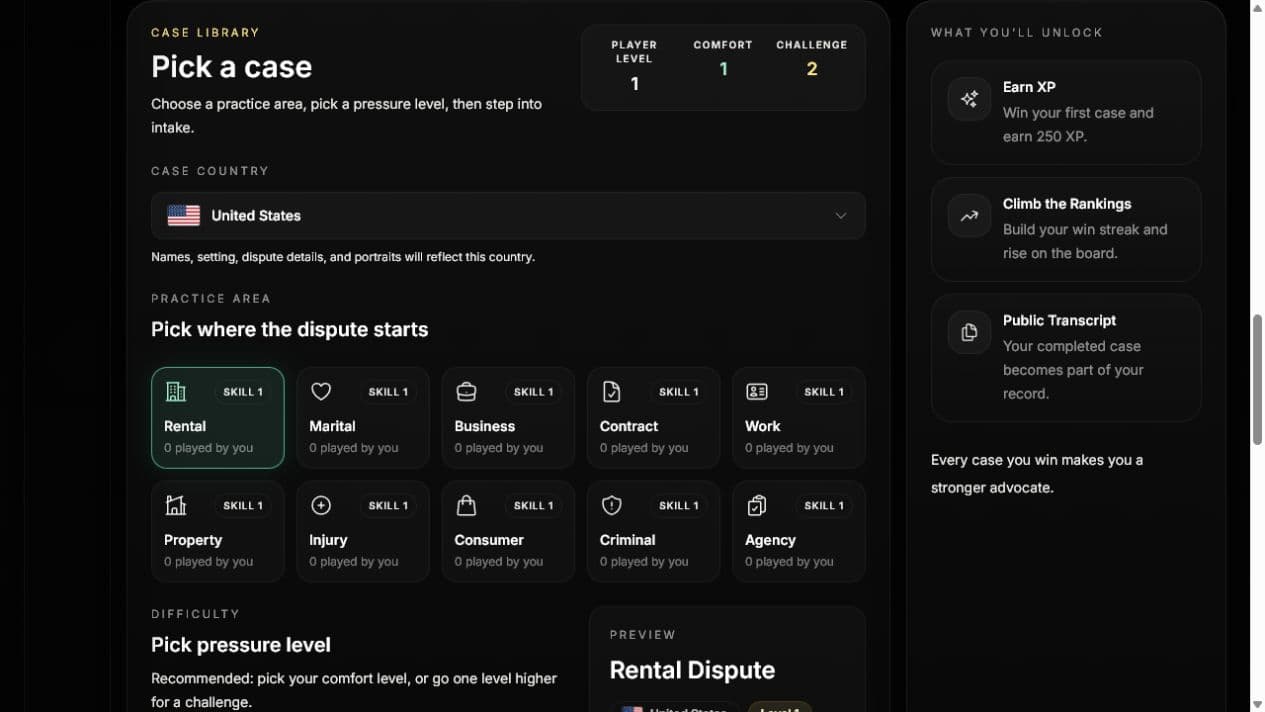
Once you start a case, the game moves into intake mode. That stage is where strong runs are usually won or lost, so begin with a matter whose facts you can read carefully and question patiently.
02
Building Your File
The intake stage is not filler. It is where you turn a messy client story into a structured file you can actually argue from. During this phase, your questions update the transcript and help shape the fact sheet that sits beside the conversation.
- Interview for dates, records, and pressure points: Ask about timeline details, witnesses, notice, documents, missing records, and anything else that could move a judge. The most useful questions narrow uncertainty rather than repeating the opening story in different words.
- Use the fact sheet as a working file: As the interview develops, keep updating the summary, theory, requested relief, timeline, supporting facts, risks, disputed facts, corroborated facts, and missing evidence fields. The side panel is meant to be edited while you think.
- Pay attention to suggested open questions: Legal Arena surfaces follow-up prompts and proof gaps underneath the intake textarea. These hints are especially useful when you have enough narrative to argue, but not enough support to survive pushback.
- Treat success chance as a live assessment: Client answers and the developing file can change the displayed assessment. It is guidance about the strength of the current record, not a guaranteed verdict. When you enter court, the assessment is locked for that courtroom run.
- Separate what helps you from what is merely said: A strong file distinguishes corroborated facts from disputed ones. If something matters but still lacks proof, move it into the missing-evidence area so you remember to handle that weakness in court instead of pretending it is settled.
- Finalize only when the file is coherent: When your theory, facts, risks, and requested relief all line up, use Finalize Fact Sheet to leave intake and move into the courtroom stage.
Fact sheet and case file
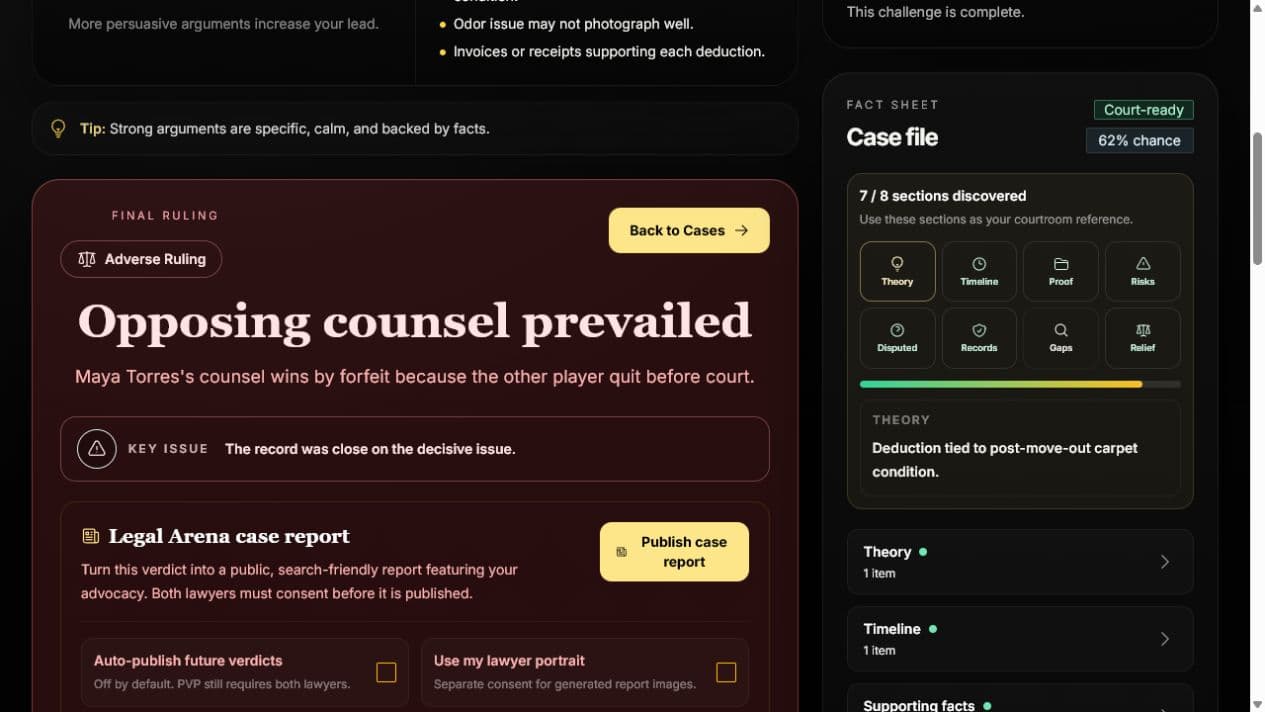
What a strong draft usually includes
- A short summary that explains the dispute in plain language.
- A theory that says why your side should prevail.
- A timeline that anchors events in a usable sequence.
- Specific supporting facts instead of broad conclusions.
- A realistic note of risks, proof gaps, and disputed facts.
- A clear statement of the remedy or relief you want.
Settlement remains a separate option during intake once your client gives authority to explore a deal. Otherwise, a disciplined intake produces better courtroom turns, cleaner verdict feedback, and more reliable progression over time.
03
Settlement Strategy
Settlement is not just haggling with the other side. In Legal Arena, it is a two-way negotiation loop: you communicate with your client, translate their goals and limits into terms, present those terms to opposing counsel, then bring the response back to your client before deciding the next move.
That means you are not only trying to win a deal. You are managing trust, risk, expectations, and leverage on both sides of the conversation.
- Get authority from your client first: Ask whether your client is willing to explore settlement. The settlement action unlocks only after the client gives authority; your lawyer cannot commit the client to talks without it.
- Start with your client's real interests: Before sending terms, understand what your client actually needs. Money, timing, confidentiality, apology language, future conduct, and certainty can matter as much as a courtroom win.
- Convert goals into concrete terms: Opposing counsel cannot accept a feeling. Turn your client's position into clear settlement terms: what is offered, what is released, what happens next, and what deadline applies.
- Present the offer strategically: When you send terms to the other side, explain why the proposal is reasonable. Use the file you built: strong facts, proof risks, litigation costs, weak spots, and what could happen if talks fail.
- Take responses back to the client: A counteroffer is not just a number to accept or reject. Read it like new information: what the other side fears, what they refuse to concede, and where your client may need to compromise.
- Know when to walk away: Settlement is useful only if the deal is better than the risk-adjusted fight. If talks fail, you can return to intake and later take the dispute to court. A rejected attempt may show a short retry timer before another settlement approach is available.
Opening settlement talks
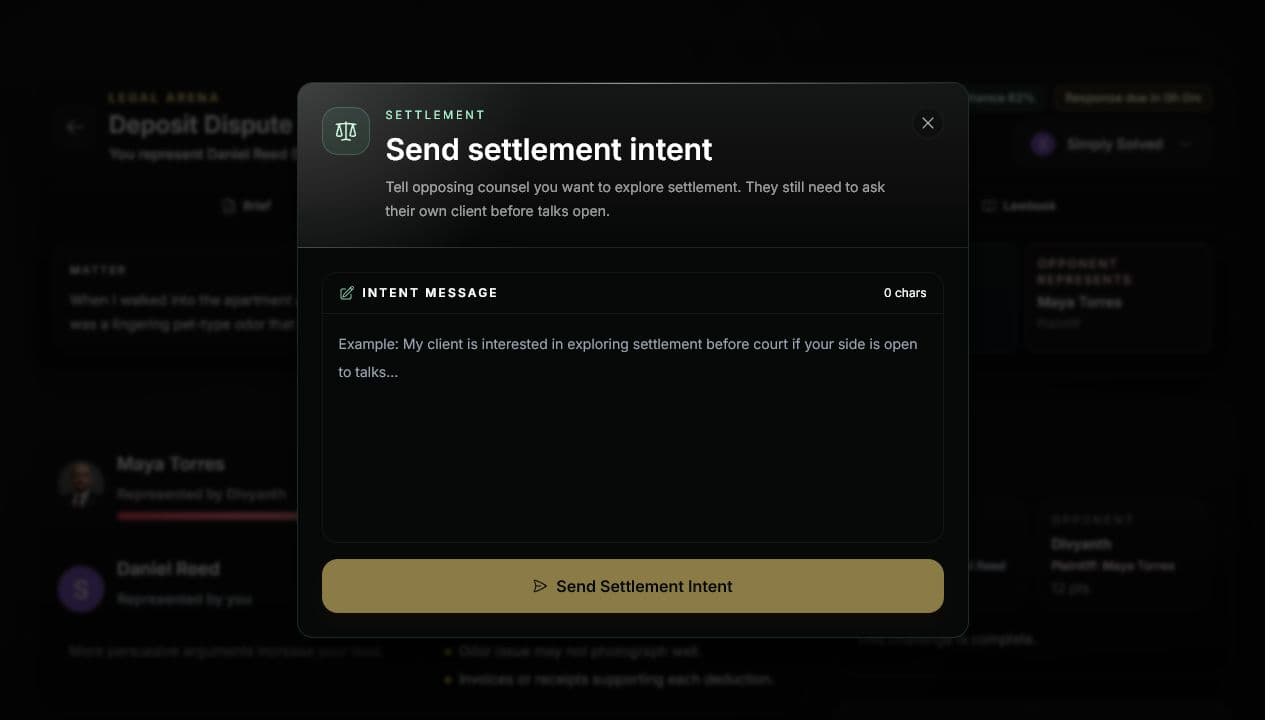
What makes a strong settlement move
- It is specific enough that both sides know exactly what happens if the deal is accepted.
- It protects your client from the biggest downside risk in the case.
- It gives opposing counsel a reason to say yes beyond simple politeness.
- It leaves you ready to argue in court if the other side refuses reasonable terms.
An accepted settlement completes the matter and contributes to progression. Settlement quality and client satisfaction can affect the XP awarded, so a deal that merely closes the file is not always the strongest result.
04
Courtroom Playbook
Finalizing the fact sheet moves a solo matter directly into court. The courtroom stage is a freeform exchange where you submit arguments in rounds, answer AI opposing counsel, and respond to the judge's feedback until the matter reaches a verdict.
- Open with your cleanest theory: Your first argument should connect the best facts in your file to the relief you want. Do not spend the opening turn on background noise if the decisive point is already clear.
- Use the lawbook on the right: Each case includes a set of rules in play. Tie your argument to those principles whenever possible. The game tracks whether you rely on the governing rules instead of arguing from vibes alone.
- Read the bench signal after every round: The bench signal hints at what just landed or what still feels weak. Treat it like courtroom feedback: tighten your next turn around the signal instead of repeating the same pitch.
- Answer the opponent directly: Pressure rises when you confront the other side's best point, explain why it fails, and return to your own theory. Ignoring the live dispute usually leads to weaker rounds.
- Argue from the file you built: The transcript and scoring are stronger when you lean on corroborated facts, acknowledge risks honestly, and avoid over-claiming unsupported details.
- Use adjournment for a curable gap: You may ask the judge to reopen intake when a specific missing fact, clarification, witness detail, or obtainable record could materially change the case. A denied request does not consume your argument turn. The judge may also adjourn after identifying the same kind of gap.
Courtroom and judge signal
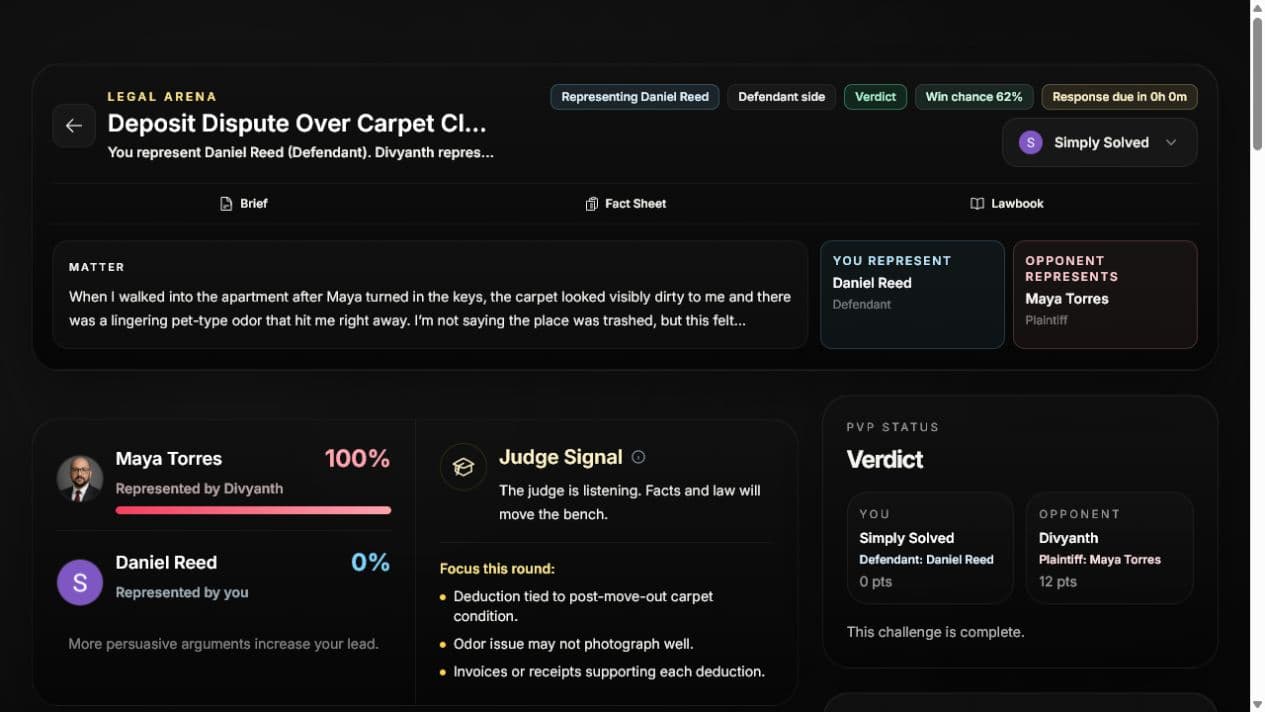
After the ruling
When the case ends, the verdict screen explains who prevailed, what landed, and what still hurt your side. Use that feedback as a study tool, not just a scoreboard.
- Review the highlights to see which parts of your theory persuaded the court.
- Review the concerns to find repeated weaknesses in your approach.
- Check the dashboard leaderboards to measure improvement across overall and category-specific play.
- Generate more fresh matters in the same specialty to strengthen pattern recognition.
- If you choose to publish a case report, review it as a public account of the completed simulation. PVP reports require both players' consent.
05
Asynchronous PVP Cases
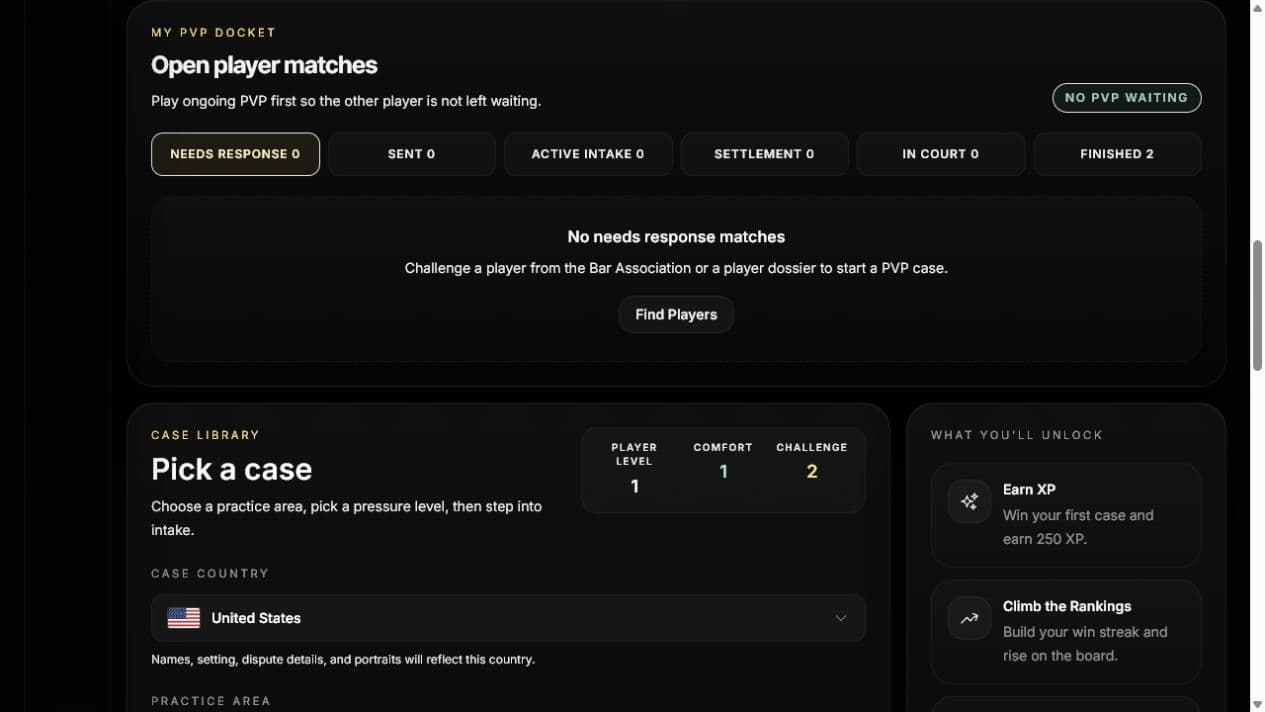
Player-versus-player cases let you challenge another Legal Arena player to argue opposite sides of the same dispute. You do not both need to be online at the same time. A challenge can unfold over hours as each player returns, prepares, and files their next move.
Think of it like a slow-burn courtroom match: each side builds a private file, then the lawyers take turns filing arguments in timed courtroom rounds.
- Challenge from a player profile: Open another player's dossier and use the challenge button there. Choose the country, case type, and pressure level, then send the invite. A pending invitation expires after seven days if it is not accepted.
- The sponsor locks the country for both sides: The country selected by the player sending the challenge becomes part of that matter. Both players receive culturally consistent names, setting, currency, institutions, and portraits, and neither side can change the country after the challenge is created.
- One player can sponsor the match: The player who sends the challenge provides access for that match. The other player can accept and play that specific PVP case even if they have not purchased full access yet.
- Each side gets a private intake: Before court, you interview your own side and build your own fact sheet. Your opponent does the same separately. This keeps preparation strategic: you know your file, but you do not automatically know what the other lawyer discovered or missed.
- Courtroom rounds are turn-based: Court opens after both fact sheets are finalized. The plaintiff files the first opening, the defendant responds, and each player may file once per round. When both sides have filed, the round is judged and the next round opens if the case is not finished.
- Watch the courtroom response clock: The workspace shows a 24-hour response window during court. Activity refreshes the deadline. If time expires, the court prepares a timeout verdict from the arguments already filed; if neither side filed, the result is a draw.
- Adjournment reopens both private files: When the judge grants an adjournment, the response clock stops and both lawyers return to private intake. Filed arguments and scores remain on the record, and court resumes only after both lawyers re-finalize their fact sheets.
- Settlement is available before court: A player can send settlement intent after receiving authority from their own client. The other lawyer must obtain authority from their client before negotiations open, and messages then alternate between the two players.
- Quitting is a forfeit: Leaving an active PVP intake, settlement, or courtroom match awards the other player the win. Use the docket to wait for the next action instead of quitting when the opponent is offline.
- PVP has its own record: Challenge wins, losses, draws, and settlements are stored in dedicated PVP stats. Public profile totals and leaderboards can combine solo and PVP performance, while the PVP docket preserves the head-to-head history.
PVP docket
How to play a strong PVP match
- Use private intake to find proof, pressure points, and risks before your opponent can force the issue in court.
- Do not assume your opponent has the same file. Their side may have different strengths, different weak spots, and a different story to tell.
- When a round is revealed, read both arguments carefully before writing the next one. The best PVP turns answer the other lawyer directly while still advancing your own theory.
- When it is your turn, answer the filed argument directly while advancing your own theory. Asynchronous play rewards patience and clean thinking.
06
Country Settings and Generated Cases
Country selection gives a newly generated matter a recognizable local setting without turning Legal Arena into a claim of exact real-world legal advice. It affects the world around the dispute while the game's lawbook and progression rules remain consistent.
- Your first selection is automatic when possible: If you have never chosen a country, Legal Arena uses the country signal supplied by its hosting platform. If that signal is unavailable, the selector starts with the United States.
- Your manual choice persists: Selecting India, the United States, or any other supported country saves that choice to your player profile. It remains selected after reloads and across devices. A browser copy is also kept as a fallback.
- The country is locked when a matter is created: Changing your profile preference affects future matters only. A case already in intake, settlement, or court keeps the country it started with so names, currency, evidence, dialogue, and portraits do not drift.
- Country and complexity do different jobs: A culturally recognizable Indian relationship dispute or a U.S. property dispute can appear at a low pressure level. Higher complexity adds more contested intent, evidence, witnesses, contradictions, and strategic risk; it is not required to unlock local themes.
- Cases stay fictionalized and playable: Generated matters use plausible names, courts, occupations, records, communication habits, social settings, and dispute triggers. They remain in English, avoid invented statute numbers and cultural caricatures, and do not promise exact legal accuracy for the selected country.
- Flags follow the matter into your record: The selected flag and country appear in previews, active workspaces, PVP briefs, dockets, and lawyer-profile archives for new matters. In lawyer-profile archives, older completed matters created before country selection was introduced are presented as United States matters.
Country flag picker
Performance and data
Fresh case generation uses faster processing where available, but a detailed matter can still take a moment to build. Legal Arena records operational AI usage such as model, feature, processing tier, token counts, and latency to improve reliability and plan fair future pricing. The usage ledger does not store raw prompts or generated responses.
When you are signed in, analytics activity may be connected to your account identifier so journeys work across sessions and devices. Read the Privacy Policy for the current disclosure and contact options.
07
Ratings, XP, and Leaderboards
Rating is your competitive standing in Legal Arena. Every player begins at 1,000. It is not a percentage, a real-world assessment of legal ability, or a traditional Elo score: the opponent's rating does not affect the points awarded.
How a court verdict changes rating
Win
+18
Before any underdog bonus
Draw
+6
A draw still improves your standing
Loss
-8
Rating cannot fall below 800
A solo court verdict applies the same point change to your overall rating and to the specialty rating for that matter's legal category. This means a contract result, for example, changes both your overall standing and your contract standing.
Underdog win bonus
When you enter court, the current success estimate is locked for that matter. If it is below 50% and you win, the following bonus is added on top of the normal +18:
Example
A player at 1,000 who wins with a locked 32% success chance receives +18 for the win and +4 as an underdog, finishing at 1,022. Losing that matter instead would result in a rating of 992.
What does not change rating
- PVP challenge results: They count in your public PVP and combined record, but currently do not change your overall or specialty rating.
- Settlements: They count as completed matters and award XP based on the matter and settlement quality, but do not add or remove rating.
- XP: XP is a separate, cumulative progression total. It does not replace rating and cannot decrease when you lose.
Why the record may not reproduce the rating
The profile record is shown as wins-losses-draws-settlements and combines solo and PVP results. Because PVP results and settlements do not change rating, and underdog wins can award extra points, multiplying the visible record by the standard values will not always reproduce the displayed rating.
Leaderboard order and milestones
The overall leaderboard sorts players by rating first, completed matters second, and XP third. Specialty leaderboards use the same order within the selected legal category. The next rating milestone shown on your profile is a progress target; it does not alter the point formula when crossed.